
PinkWallet Website Logo
Join early access
Vercel AI SDK logo
AI SDK · VercelAgent keyAbout 3 minVerified 2026-10-12

Connect Vercel AI SDK to Pink Agentic AI Payments

pinkTools({ agentKey }) wraps Pink as four Vercel AI SDK tools; no MCP client needed, no signup to try it. Works with generateText, streamText and Agent loops built with the Vercel AI SDK. Plans: Open source.

What you get

Vercel AI SDK asks Pink before it pays

Once connected, an AI SDK agent can check its budget, request a payment and poll a pending approval through four tools: request_payment, check_policy, get_budget and check_payment_status. pinkTools() wraps the official pink-agentic-payments REST client directly as ai tool() definitions, with no MCP server or client in the loop. The rules you set in Pink decide each request: allowed on the spot, sent to a person, or blocked. The agent never holds a standing card or your account keys, only a single-use test credential once a payment is allowed.

Install the package

Vercel AI SDK · bash
npm install pink-agentic-payments-ai-sdk ai zod

pink-agentic-payments-ai-sdk wraps the official pink-agentic-payments JS client as AI SDK tools.

Step by step

  1. 1

    Create a free sandbox workspace

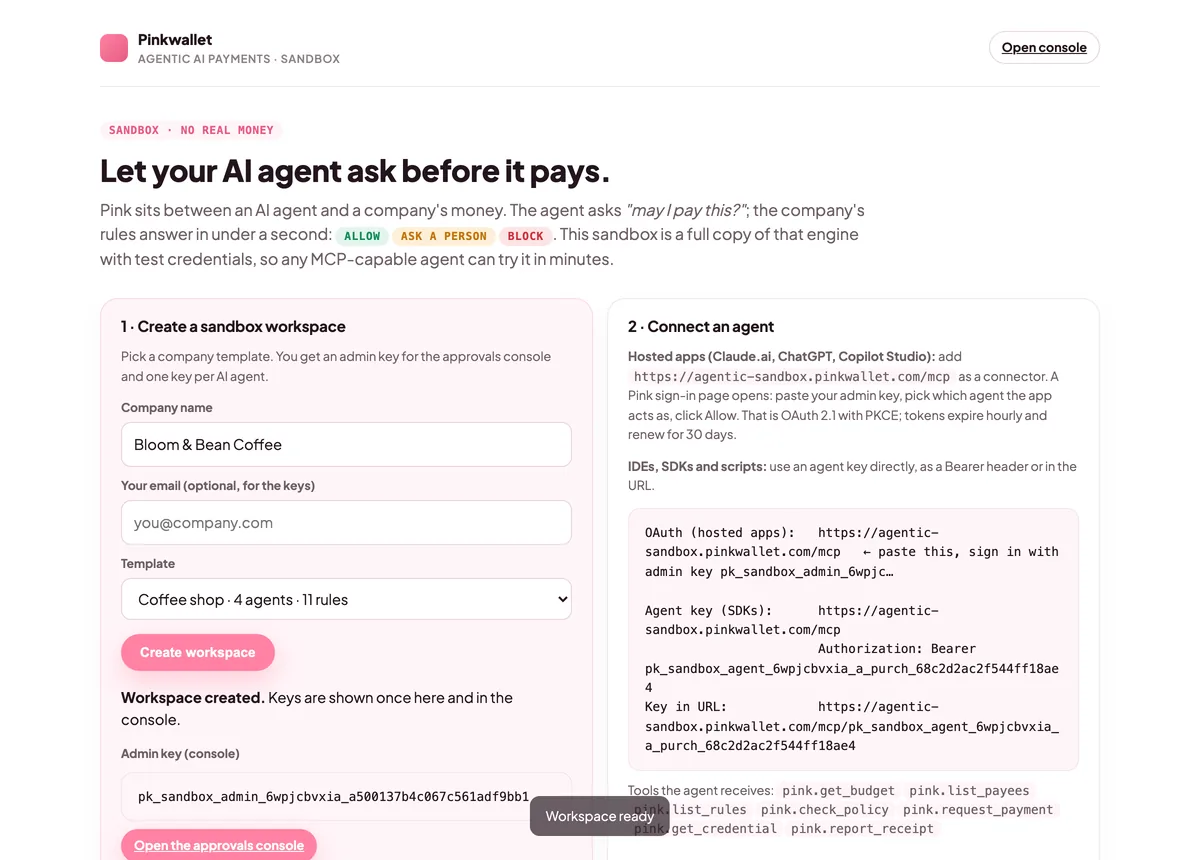
    Open agentic-sandbox.pinkwallet.com, type a company name, pick a template (coffee shop, startup or e-commerce) and click Create workspace. You get an admin key for the console and one key per AI agent. Keep the admin key: the sandbox console asks for it. Or skip the browser entirely and call createSandboxWorkspace() from the official JS client, shown in the code below.
    After creating a workspace: the admin key and one key per agent are shown once
    After creating a workspace: the admin key and one key per agent are shown once
  2. 2

    Install the packages

    Run npm install pink-agentic-payments-ai-sdk ai zod. pink-agentic-payments-ai-sdk wraps the official pink-agentic-payments JS client as four AI SDK tools; zod is what the tool schemas are declared with.
  3. 3

    Hand the tools to generateText

    Call pinkTools({ agentKey }) and spread the result into the tools option of generateText, streamText, or an Agent. No MCP transport or extra client setup; it is a plain object of ai tool()s.
  4. 4

    Read the decision

    Each outcome comes back from request_payment as plain text the model can read and act on, not a thrown error — confirmed in a live run against the sandbox on 2026-10-12: allowed — "decision=allowed payment_id=pay_f645358d4fd2 credential_type=virtual_card"; blocked — "decision=blocked payment_id=pay_e6b212a7434f rule=\"Eng Infra AI's monthly budget is used up\""; pending_human — "decision=pending_human payment_id=pay_e2b780b5f3fa approver=Sarah Kim (CFO)", which check_payment_status later resolved to approved once the hold was approved in the console.
  5. 5

    Watch the approval land in the console

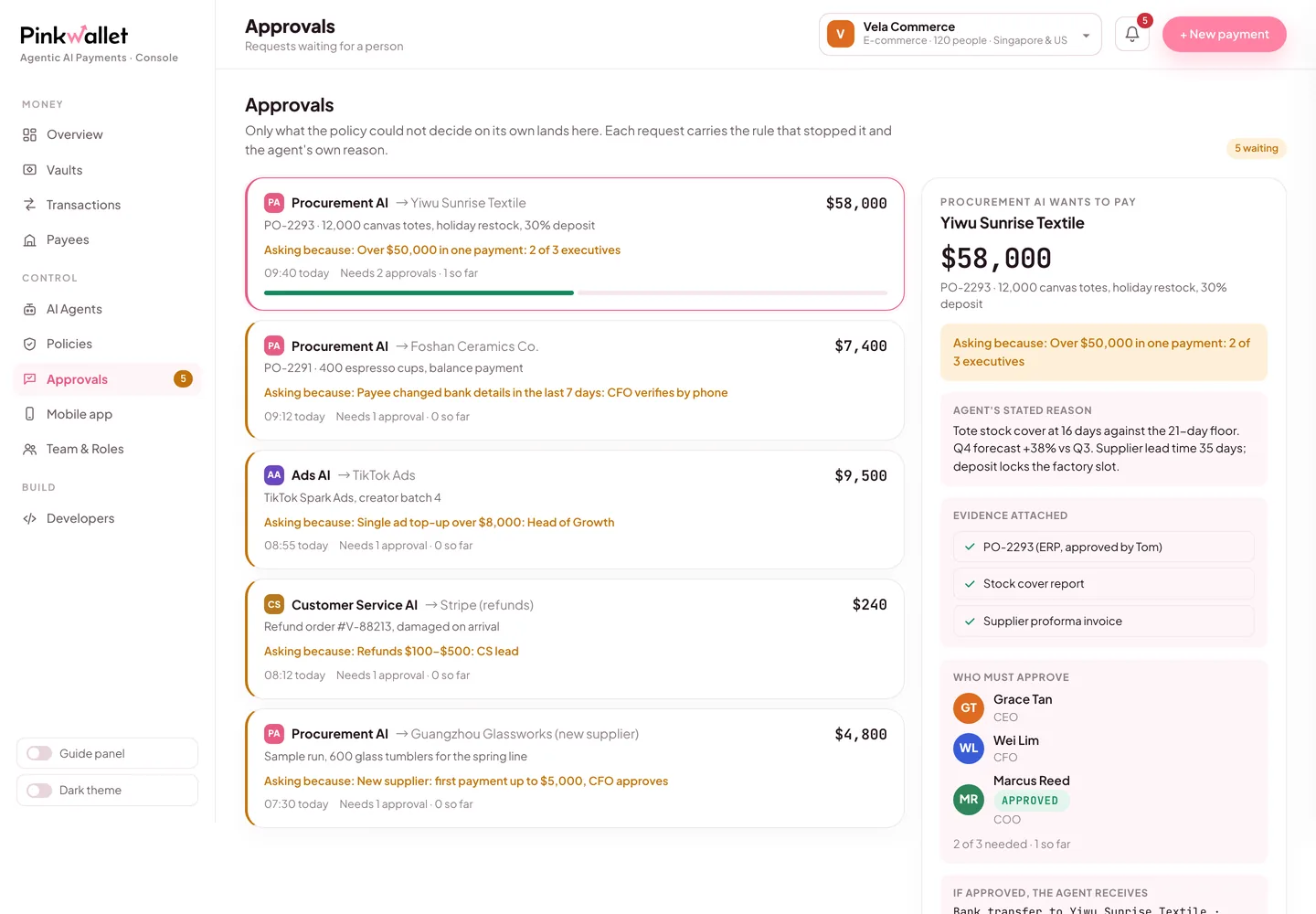
    Open the sandbox console (link on the workspace page). Requests that cleared, asked a person or were blocked are all listed with the rule that decided them. Approve the pending one and the agent continues.
    Approvals in the console: the rule that stopped the request, the agent's reason, the evidence
    Approvals in the console: the rule that stopped the request, the agent's reason, the evidence

The configuration, ready to paste

Vercel AI SDK · typescript
import { generateText, stepCountIs } from "ai";
import { google } from "@ai-sdk/google";
import { createSandboxWorkspace } from "pink-agentic-payments";
import { pinkTools } from "pink-agentic-payments-ai-sdk";

// 1. Spin up a free sandbox workspace (test money, seeded with agents/payees/rules)
const workspace = await createSandboxWorkspace({ company: "My Test Co", template: "startup" });
const agentKey = workspace.agents[0].key;

// 2. Hand the tools to an AI SDK agent
const { text } = await generateText({
  model: google("gemini-3.8-flash"),
  tools: pinkTools({ agentKey }),
  stopWhen: stepCountIs(5),
  prompt: "Check the budget, then pay Figma $50 for our design tool renewal.",
});

console.log(text);

Replace <agent_key> with the key of the agent this ai sdk should act as. Each agent has its own key, budget and rules.

Try it: say this to Vercel AI SDK

Say this

“Check my budget with Pink, then pay Figma $50 for our design tool renewal.”

What you will see

This exact prompt ran live against the sandbox: Pink allowed it on the spot with a single-use test credential (decision=allowed). Ask for something above the agent's monthly budget instead and request_payment comes back blocked with the rule; ask for a mid-size amount above the single-payment cap and it comes back pending_human with the approver's name, until a person approves it in the console.

Why those two rules exist →

Pink's side, in three screens

The sandbox workspace page with the admin key and one key per agent
Keys are shown once when the workspace is created.
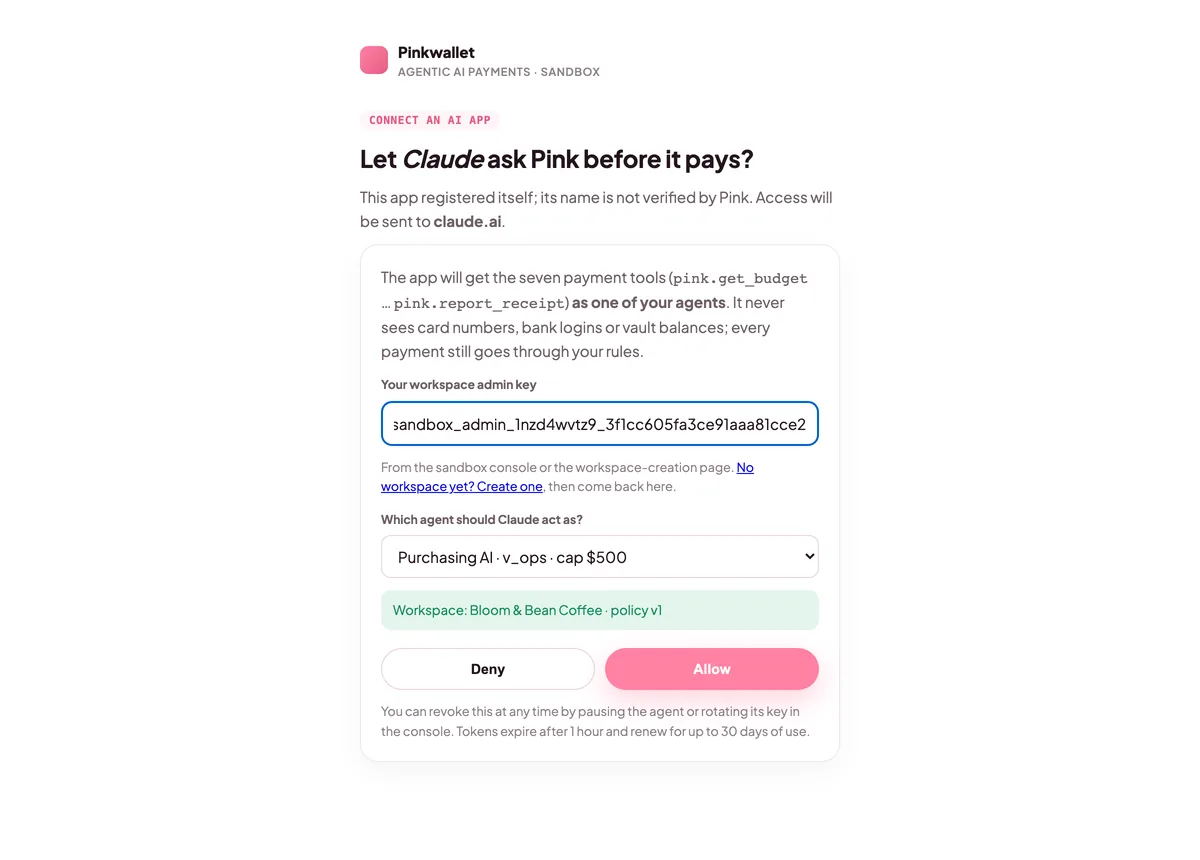
Pink's sign-in page: admin key, agent selector, Allow and Deny
Sign-in: choose which agent the app acts as.
The console's Approvals tab with a pending request
Requests that need a person wait here and on the phone.

FAQ

Does this talk to Pink over MCP?

No. pinkTools() wraps the official pink-agentic-payments REST client directly as AI SDK tool() definitions with zod schemas. There is no MCP server or client involved; use one of the MCP connect guides instead if you want that route.

Which models did you test this with?

The live run in this guide used google("gemini-3.8-flash") via @ai-sdk/google. pinkTools() only defines tools, so it works with any model the AI SDK supports.

Official documentation

Menu names and settings paths follow each vendor's documentation at the verified date. If a vendor moves a menu, the linked page is the source of truth; the Pink side does not change.

Other clients